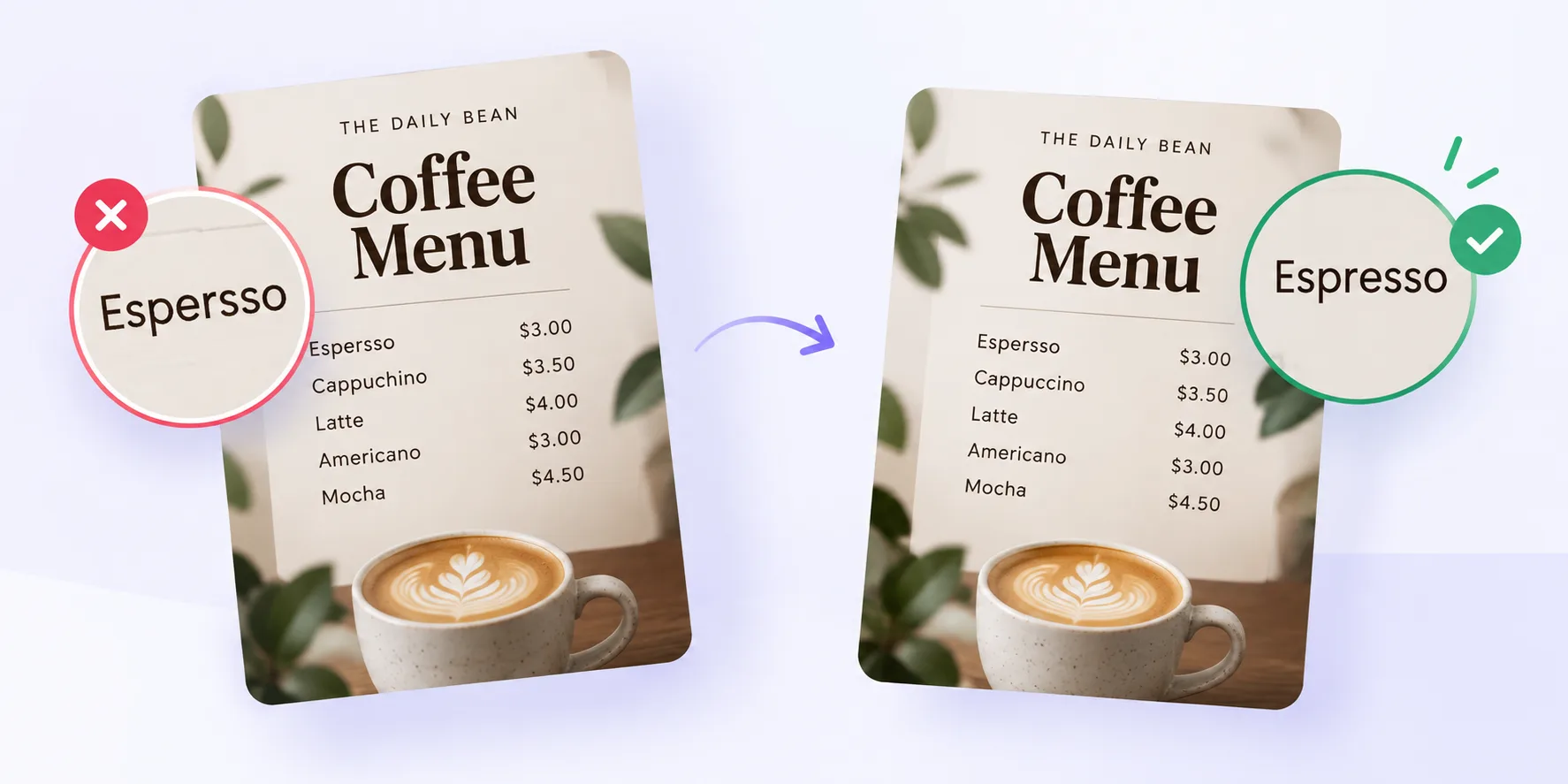
You asked Midjourney for a coffee shop menu. It gave you “Espersso” and “Cappucchino.” You prompted for a birthday card that says “Happy Birthday, Mom” — and got “Happy Birthdya, Momm.” Sound familiar?
AI image generators are brilliant at pixels but terrible at letters. This post explains why ai generated image text errors keep happening in 2026, what the most common ones look like, and a simple review workflow to catch them before your design goes out to a client, a print run, or a paid ad.
Even the newest models — Google’s Imagen family, Midjourney v7, Flux, and the latest GPT image tools — still hallucinate letters. The good news: once you know what to look for, catching these mistakes takes minutes.
Why AI Image Generators Struggle With Text
Text should be easy for a machine, right? It isn’t. Here’s what’s actually happening under the hood.
They draw letters, they don’t type them
An AI image model doesn’t “write” the word BAKERY the way a word processor does. It paints the shape of what a bakery sign usually looks like — curved lines, a tail on the R, a crossbar on the A. If the model gets even one shape slightly wrong, you get “BAKREY” or “BAKEPY.” The model isn’t spelling. It’s sketching from memory.
Training data teaches shapes, not spelling
These models learn from billions of images. Most of that training teaches them what letters look like on signs, mugs, t-shirts, and packaging. Very little of it teaches them what letters mean. The result: a rich visual vocabulary with weak linguistic grounding.
Diffusion adds noise, then guesses
Most image generators use diffusion. They start with pure static and slowly “denoise” it into a picture. Small letters are the first casualty of that process. By the time the image sharpens, the model has already committed to a slightly wrong shape — and can’t undo it.
The Most Common AI Generated Image Text Errors
Once you start looking, you’ll see the same patterns show up again and again. The biggest ai generated image text errors fall into these buckets:
- Missing or doubled letters — “COFEE” instead of “COFFEE,” or “BIRTHDAAY” instead of “BIRTHDAY”
- Swapped letters — “RESTUARANT” instead of “RESTAURANT”
- Invented characters — glyphs that look almost like letters but aren’t in any alphabet
- Mixed scripts — Latin letters mashed with what looks like Cyrillic or Greek
- Ghost text — faint half-words fading in the background of an otherwise clean design
- Inconsistent capitalization — “BeSt CoFfeE In ToWn” with no logic to it
- Broken kerning — letters crammed together or drifting apart in the same word
- Warped signage — the word bends around a curve and loses a letter on the turn
The tricky part? These mistakes don’t happen every time. You might generate ten clean posters and one that says “SALE 50% OFFF.” That randomness is exactly why the errors slip through review.
Why These Errors Slip Past Reviewers
Human eyes are wired to auto-correct. Read this sentence: “Yuo can porbalby raed tihs eevn thuogh the ltteers are jubmled.” Your brain filled in the gaps without asking.
That’s a superpower for reading emails. It’s a liability when you’re reviewing an AI image. Designers, marketers, and clients skim visuals for vibe first — is the mood right, is the palette on brand — and text second. By the time someone spots “COFEE,” the image is already in a client deck, a paid ad, or a print job.
Small text makes it worse. A billboard mockup at 30% zoom hides letter-level mistakes completely.
How to Catch AI Generated Image Text Errors Before You Ship
You don’t need a fancy workflow. You need a checklist.
- Zoom to 100% before approving. Never sign off on a thumbnail.
- Read every word out loud. Skimming is the enemy. Speaking forces you to process each letter.
- Verify every language on the image. If there’s Hindi, Arabic, or Chinese text, get a native speaker to check. Models are worst at non-Latin scripts.
- Look at edges and curves. Signs that wrap around objects tend to lose letters at the bend.
- Compare against your prompt. If you asked for “Grand Opening” and got “Grand Openning,” you’ll only notice if you re-read the brief.
- Get a second pair of eyes. Fresh reviewers catch what tired ones miss.
A Faster Way to Review AI Images
Manual checking works, but it’s slow — especially when you’re generating dozens of variations for A/B tests, ad creative, or product mockups.
That’s where a purpose-built review tool helps. BugSmash’s free Image Spelling Checker scans your AI-generated image, extracts the text it detects, and flags spelling issues in seconds. Upload a poster, banner, or social ad, and you’ll see exactly what a human viewer would read — before the client does.
For team-wide review, BugSmash also lets you drop pins directly on images, videos, PDFs, and live websites, so designers, copywriters, and clients leave feedback in one thread instead of scattered across email and Slack.
FAQs
Will AI image generators eventually spell correctly?
They’re getting better fast. Newer models handle short words well now. But long phrases, non-Latin scripts, and small text still trip them up. Assume you need to check every generation.
Which generators handle text best in 2026?
Ideogram, Flux, and the latest GPT image tools currently lead for text accuracy. Midjourney has improved but still struggles with long strings.
Can I fix spelling in an AI image without regenerating?
Yes. Photoshop’s Generative Fill, Canva’s inpainting, and similar tools let you erase the wrong letters and either retype in a real font or regenerate that patch only.
Does prompt engineering help?
A little. Wrapping text in quotes (Sign reads: ‘BAKERY’) and keeping strings short both improve accuracy. Neither is a guarantee.
Are these errors a legal issue?
Usually no — but misspellings on paid ads, product packaging, or client deliverables cost real money to fix after launch. Prevention is cheaper than reprints.
Wrapping Up
AI image generators have crossed from novelty to production tool, but their weakness with text hasn’t gone away. Every generation is a small gamble, and the house occasionally wins with an “ESPERSSO.”
Build a review habit, use a spelling checker made for images, and never approve a design at thumbnail size. Your future client-feedback thread will thank you.
Ready to catch mistakes before they ship? Try BugSmash’s free Image Spelling Checker →


Leave a Reply