
Ever emailed a PDF around for review and ended up with “final_v3_REAL_final.pdf” sitting in your inbox next to two other “finals”? You’re not alone. A weak document approval workflow is the reason marketing decks miss deadlines, contracts get signed with typos, and design proofs come back three times before anyone spots the wrong logo. In this guide, we’ll break down what a document approval workflow actually is, why version chaos happens, and how teams review PDFs, slide decks, and Word docs without losing their sanity — or their file names. Short on time? Jump to the checklist near the end.
What Is a Document Approval Workflow?
A document approval workflow is the step-by-step process a team follows to review, revise, and formally sign off on a document before it goes out. It defines who drafts the file, who reviews it, how feedback is gathered, and who has the final call on approval.
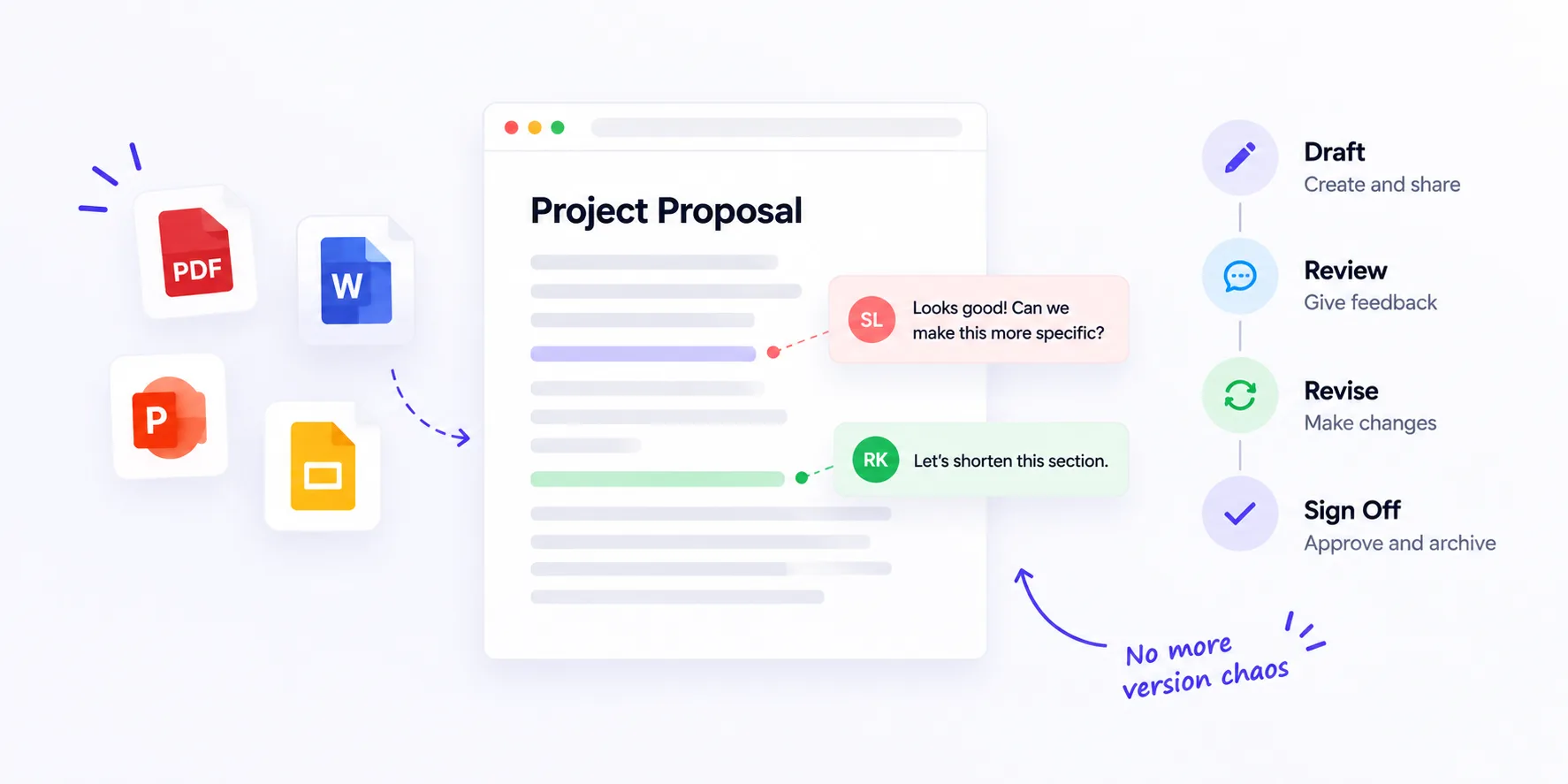
In practice, four things happen in order:
- A draft owner creates the first version.
- Reviewers add comments in context.
- The owner consolidates feedback and revises.
- A designated approver signs off.
Simple on paper. Chaotic in real life.
Why Version Chaos Actually Happens
Version chaos isn’t a discipline problem. It’s a tooling problem. A widely-cited Perforce study found that 83% of knowledge workers lose time to document versioning issues every day. When feedback lives in five places — email, Slack DMs, tracked changes, screenshots, and someone’s handwritten notes — nobody has the full picture. You end up merging comments by hand and missing at least one.
The usual triggers:
- Reviewers download the file, mark it up locally, and email it back.
- Two people edit the “master” copy at the same time.
- Feedback arrives after the deadline through a different channel.
- Nobody is sure which version is current.
The cost adds up fast — hours a week lost chasing the latest file, and worse, wrong versions going out to clients.
The Anatomy of a Clean Document Approval Workflow
A workflow that holds up under pressure has four distinct stages. Each stage has a single owner and a clear exit condition.
Stage 1 — Draft and Ownership
One person owns the document. They upload the first version to a shared location and tag specific reviewers by name. No mass CC. No vague “let me know if you have thoughts.” The draft owner also sets a deadline for comments — usually 24 to 72 hours, depending on document length.
Stage 2 — In-Context Review
Reviewers leave comments directly on the file, pinned to the exact paragraph, slide, or clause they’re reacting to. This is where most teams break down. Email threads and Slack chats strip context. If a comment says “this needs to be softer” but you don’t know which sentence, you’re guessing.
Stage 3 — Consolidated Feedback and Revision
The draft owner reviews every comment in one place, resolves conflicts (two reviewers disagreeing is normal), and produces a revised version. Every change should trace back to a specific comment.
Stage 4 — Sign-off and Archive
The final approver reviews the revised version and formally approves it. The approved file becomes the source of truth. Older versions get archived — not deleted. You want the trail.
Formats That Break Traditional Review Tools
Not every document plays nicely with basic comment features. Watch out for:
- PDFs from external vendors — often flattened, so Acrobat comments don’t survive.
- Slide decks with embedded video or animation — screenshots kill the motion.
- Long Word documents — tracked changes become unreadable after three rounds.
- Design mockups and Figma exports — need pixel-precise pins, not paragraph comments.
- Compliance and legal PDFs — require an audit trail regulators can actually inspect.
If your review tool can’t handle these, workaround emails will always be floating around.
A Different Take: Approval Is a Trail, Not a Signature
Here’s where most guides get it wrong. They frame approval as a single moment — the boss clicks “approve,” the document is done. But the real value of a document approval workflow isn’t the click at the end. It’s the trail of decisions behind it.
Every comment, every “let’s change this,” every disagreement resolved — that’s the record that saves you six months later when a client asks why a clause reads a certain way, or when legal wants to know who signed off. Treat approval like a paper trail, not a rubber stamp, and your workflow starts protecting the team instead of just closing tickets.
How BugSmash Fits In
BugSmash was built for exactly this kind of review. You upload a PDF, deck, image, video, audio file, or webpage, share one link with reviewers, and everyone leaves pinned comments directly on the file. No downloads. No logins for reviewers. No “which version is this again?”
The version handling is the real win for approval workflows. When you make the requested changes, you upload the new version on top of the old one — and reviewers can toggle between versions to check that their specific feedback was actually applied. Comments stay tied to context. Threads plug into Slack, Jira, ClickUp, and Asana, so the trail moves with the work instead of around it.
Quick Checklist for a Solid Workflow
- One draft owner per document
- One shared link, not attachments
- Comments pinned in context
- Clear deadlines for reviewers
- One consolidated revision round when possible
- Formal sign-off from a single approver
- Old versions archived, not deleted
FAQs
What is a document approval workflow?
It’s the structured process teams follow to draft, review, revise, and formally approve a document before it’s published or shared externally.
How do I stop version chaos in document reviews?
Use one shared link instead of email attachments, pin comments to specific sections, and appoint a single draft owner responsible for merging feedback.
How many approval stages should a document have?
Most documents work well with three to four stages: draft, review, revise, and sign-off. Adding more usually slows things down without improving quality.
What’s the best way to review PDFs and slide decks with a remote team?
Use a visual feedback tool that lets reviewers comment directly on the file without downloading it, so context and feedback stay in one place.
Conclusion
Version chaos isn’t inevitable. It’s a symptom of scattered feedback and unclear ownership. A tight document approval workflow — clear owner, in-context comments, one revision round, and a formal sign-off — cuts review cycles and gives you an audit trail your future self will thank you for. Whether you’re approving a two-page contract or a 60-slide investor deck, the shape of the process stays the same. Get the shape right, and the file names take care of themselves.



Leave a Reply