
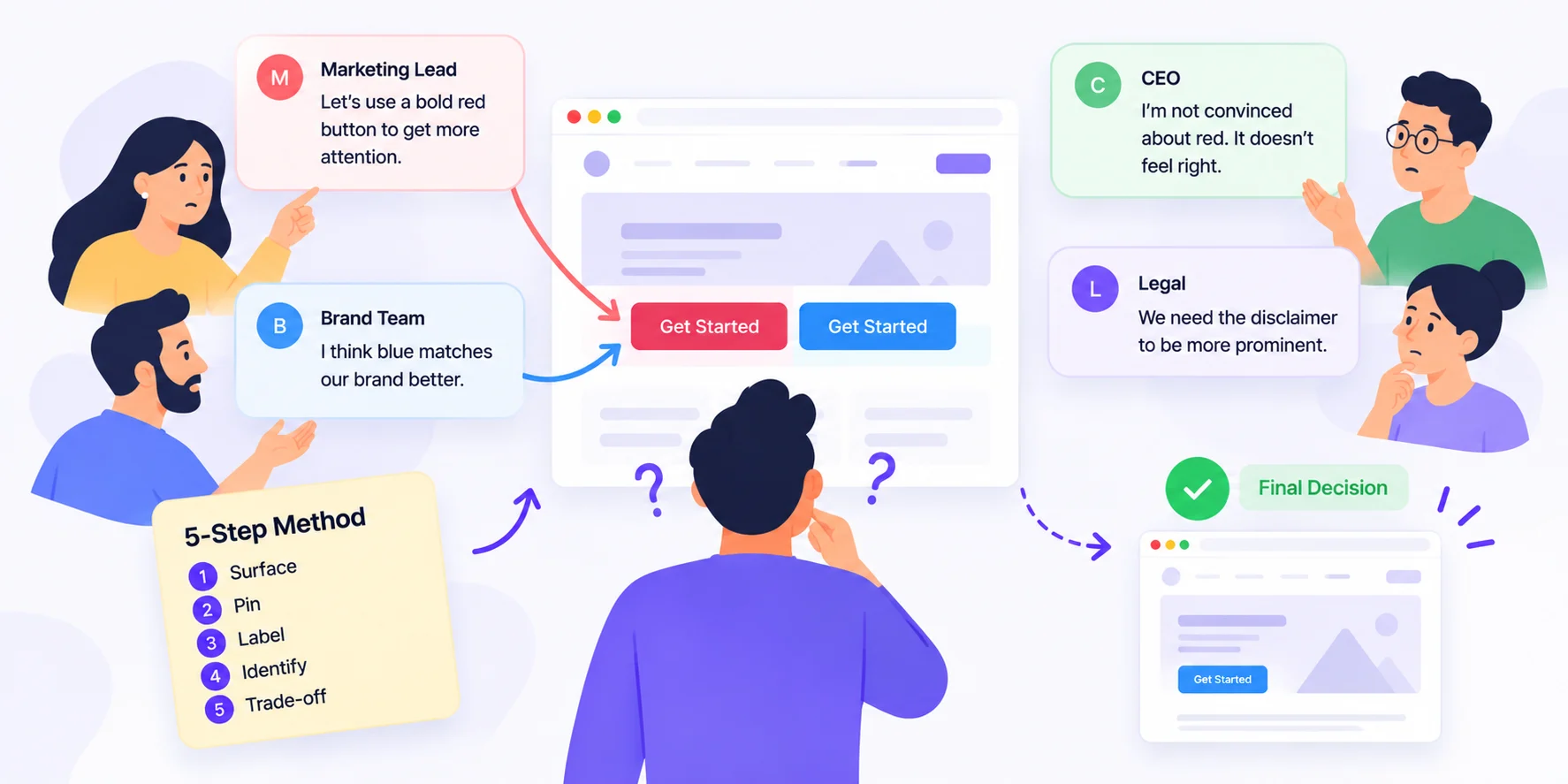
To handle conflicting client feedback, don’t pick a side and don’t blend both requests into one design. Put every comment in one place, separate opinions from requirements, find the one person with final say, and ask them to choose between clear options in writing. Your job is to make the decision easy, not to make it for them.
That’s the short answer. Below you’ll find the SPLIT method, a five-step process with copy-and-paste scripts for every step. Use it the next time the marketing lead wants a bold red button and the CEO “just doesn’t like red.” It works for website reviews, video edits, ad creative, PDFs and any other project where more than one person signs off.
Why Conflicting Client Feedback Happens
When two stakeholders disagree, it feels like a design problem. It almost never is. It’s a decision problem.
Most clashes come from three places:
- Different goals. Sales wants more leads. Brand wants polish. Legal wants fewer claims. Each person reviews the work through the lens of their own job.
- No clear decider. Nobody said who has the final word, so every comment carries equal weight.
- Scattered channels. One note comes by email, another on WhatsApp, a third on a call. Reviewers never see each other’s comments, so they never realise they disagree.
Here’s the part most advice skips: the worst thing you can do is quietly “average” the feedback. Half of one request plus half of another gives you a design nobody asked for, and both stakeholders end up unhappy. A conflict you hide doesn’t go away. It just comes back in the next revision round, usually louder.
The SPLIT Method for Resolving Conflicting Client Feedback
SPLIT stands for Surface, Pin, Label, Identify, Trade-off. Follow the steps in order.
1. Surface every conflict in one place
You can’t fix a disagreement that lives in five inboxes. Move all feedback onto the work itself, where every reviewer can see every comment.
Script: “To keep things simple, please add all feedback directly on this review link. If it isn’t on the link, we may miss it.”
2. Pin each comment to a person and a goal
For every clashing pair, note who said it and what they’re trying to achieve. “Make the logo bigger” often really means “I want our brand to stand out.” Once you know the goal, you can often meet it in a way both people accept.
Script: “Quick question so we get this right: what result are you hoping this change will create?”
3. Label it: preference or requirement
Not all feedback carries the same weight. Sort it before you act.
| Type | Example | What to do |
|---|---|---|
| Requirement | “The disclaimer is legally required.” | Apply it. Not up for debate. |
| Goal | “We need more demo sign-ups.” | Test options against the goal. |
| Preference | “I don’t like this shade of blue.” | Send it to the decider. |
Requirements usually win. Two preferences that clash go to step 4.
4. Identify the decider
Every project needs one final approver. If nobody was named at kickoff, ask now, politely and in writing.
Script: “We have two different directions on the hero section. Who should make the final call so we can keep the project on schedule?”
5. Trade-off on the record
Give the decider two or three options, each with its upside or cost. Never send an open-ended “What do you think?”
Script: “Option A keeps the red button, which matches the campaign. Option B uses blue, which matches the brand guide. Both can go live Friday. Which would you like?”
Then save the answer where everyone can see it. A written decision ends the debate. A verbal one restarts it next week.
Scripts for the Toughest Moments
When a senior stakeholder overrules the team
“Happy to go with that. Just flagging that it changes what we agreed with [name] earlier. Shall I let them know, or would you prefer to?”
When a settled conflict comes back
“We agreed on this in round two (see the approved version). Would you like to reopen it? It may affect the timeline.”
When feedback contradicts the brief
“This is different from the brief approved on [date]. We can treat it as a new request. Want me to share the impact on time and cost?”
How BugSmash Supports the SPLIT Method
A good process works better with a tool that keeps everyone on the same page. Here’s how BugSmash fits each step:
- Surface: Share one review link. Clients and guests comment directly on websites, videos, PDFs, images and more, with no sign-up. For issues spotted on a live site, the feedback widget captures reports with a screenshot attached.
- Pin: Every comment sits on the exact spot it refers to, so clashing notes are easy to spot side by side.
- Label: Use private comments to talk through a conflict with your own team before you reply to the client.
- Identify: Add a welcome note to the project that names the final approver, and use the approval workflow so a round only closes with a clear sign-off.
- Trade-off: Upload each option as a version and compare them. Set due dates and reminders so decisions don’t stall, and pause commenting once a round is closed.
After the decision is made, you can hand the approved comments to an AI agent through the BugSmash MCP server. See how agencies run client reviews on the agencies page, or compare plans on the pricing page. MCP is included from the Free plan up, and guests are unlimited.
FAQ
What is conflicting client feedback?
It’s when two or more stakeholders give opposite instructions on the same part of a project, like one asking for a shorter headline while another asks for more detail.
Should I decide which feedback to follow?
No. Share your recommendation, but let the named decider make the final call. That keeps you out of office politics and protects the relationship.
How can I prevent conflicting feedback?
Name one final approver at kickoff, collect all feedback in one shared place, and link every change back to the approved brief.
What if the decider doesn’t respond?
Set a clear deadline with a default. For example: “If we don’t hear back by Thursday, we’ll go with Option A, as it matches the brief.”
How do I stop the same debate from coming back?
Record every decision in writing, next to the version it applies to. When it resurfaces, point to the approved version and treat any change as a new request.
Can a tool resolve stakeholder conflicts for me?
No tool makes the decision. But a shared review space shows conflicts early, while they’re still small and cheap to fix.
Conclusion
Conflicting client feedback isn’t a sign that your work is wrong. It’s a sign that the decision hasn’t been made yet. Bring every comment into the open, separate requirements from preferences, find the person who owns the call, and give them clear trade-offs to choose from. Do that, and you stop being the referee and go back to being the expert they hired.
Ready to put every stakeholder on the same review link? Start free with BugSmash.



Leave a Reply