
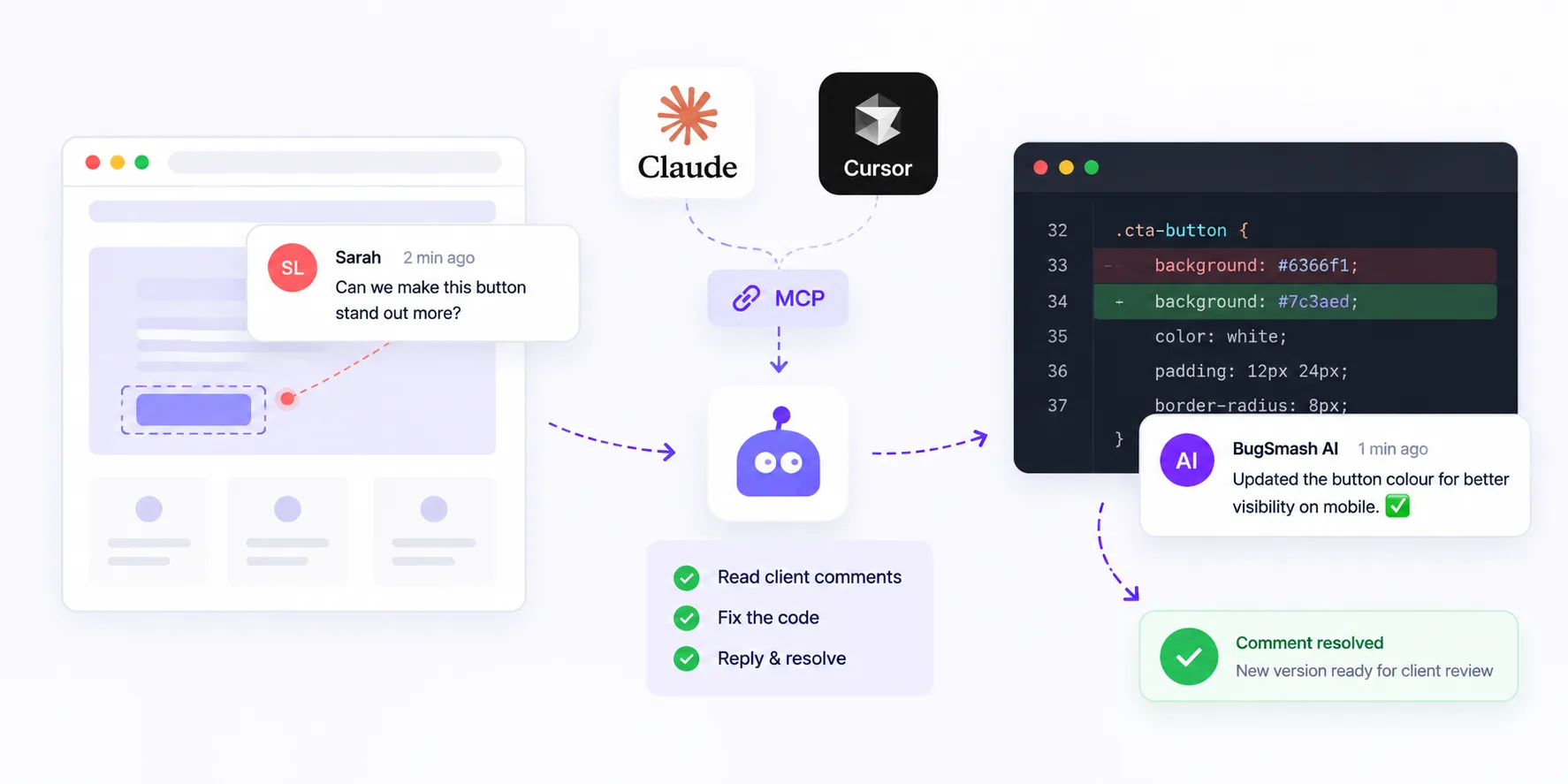
Yes, you can let Claude Code or Cursor fix client feedback for you. Connect your feedback tool to the agent through an MCP server, and it can read each pinned comment, change the code, reply in the thread and mark the comment resolved. Your client still gives the final approval.
That is the short answer. To fix client feedback with an AI coding agent reliably, you need three things: feedback that carries context (where, what, which version), a secure MCP connection, and a clear rule about what the agent may touch. This guide walks through the full workflow with BugSmash, Claude Code and Cursor, and shows where a human should stay in the loop.
TL;DR
- MCP (Model Context Protocol) lets AI tools like Claude Code and Cursor talk to apps such as BugSmash.
- Your agent reads client comments, fixes what it can, replies in the thread and resolves the comment.
- It can then add a new version so the client reviews and approves the change.
- Keep subjective or business decisions with people, not the agent.
- The BugSmash MCP server is included on every plan, including Free. Approval status starts on the Starter plan.
What “fixing feedback automatically” really means
Most feedback loops break in the middle. A client leaves a note like “the button is hard to read on mobile.” Someone copies it into a ticket. A developer finds the page, finds the element, guesses the fix and then emails the client to say it is done. Nobody enjoys this part, and it is where days go missing.
An MCP connection removes that middle step. The agent sits in your code editor or terminal, so it already knows your codebase. Through MCP it can also see the BugSmash project, the version the client reviewed and the exact comment thread.
Here is our take: the agent should close comments, not projects. Speed is great, but sign-off belongs to the client. The best workflow lets the agent do the repetitive fixes, then hand a fresh version back for approval. You get the time savings without the risk of an AI telling a client “all done” on their behalf.
What you need before you start
- A BugSmash project with client comments. Share a review link for a live website or HTML file, or install the feedback widget so clients report issues from the page itself.
- Claude Code or Cursor, opened in the project repo. Other MCP clients such as Windsurf, Cline, Codex and Zed also work.
- The BugSmash MCP server connected. Setup details live on the MCP page.
- Write access turned on, when you are ready. Read tools are on by default. Write tools can be switched on per workspace.
How to fix client feedback with an AI coding agent: step by step
- Collect feedback where the work lives. Clients click on the page and type. They do not need an account, so you get more precise comments and fewer vague emails.
- Add the BugSmash MCP server to your agent. In Claude Code, run
claude mcp add --transport http bugsmash https://api.bugsmash.io/mcp. In Cursor, add the same URL to yourmcp.jsonfile undermcpServers. - Sign in once with OAuth. The agent acts as you, so it only sees the workspaces and projects you can already see.
- Ask the agent to triage first. Have it pull the open comments (
list_comments) and read the threads (list_replies). Ask it to sort them into three groups: code fixes, copy changes, and items that need a client decision. - Let it fix one group at a time. Keep the agent on a separate branch. Review the diff like you would review a teammate’s pull request.
- Close the loop inside BugSmash. The agent replies in each thread to explain the change (
create_reply) and updates the comment status (update_comment). - Send a new version for sign-off. Once the fix is live on staging, add a new version (
create_version) so the client can compare and approve. On Starter and above, the project’s approval status can then be updated (update_project).
A starter prompt you can copy
“Read the open BugSmash comments on the Homepage v3 project. Group them into code fixes, copy changes and items that need the client. Fix only the code group on a new branch. Reply in each thread with what you changed, then mark those comments resolved. List anything you skipped and why.”
Which comments to give the agent (and which to keep)
Not every comment is a good fit for automation. A simple rule: if two developers would make the same change, the agent can probably make it too.
Good fits for the agent:
- Spacing, alignment and font-size tweaks
- Low colour contrast or missing alt text
- Typos and small copy edits the client wrote out word for word
- Broken links and layout bugs on one screen size
Keep these with your team:
- Taste notes like “make it feel more premium”
- Brand, legal or pricing wording
- Anything that changes scope, budget or timeline
- Comments where two stakeholders disagree
How BugSmash compares with BugHerd, Marker.io and Pastel
To be fair, BugSmash is not the only feedback tool with an MCP server. BugHerd, Marker.io and Pastel all offer MCP connections to Claude and Cursor. Marker.io focuses its MCP on bug reports and the technical data attached to them. BugHerd connects agents to its projects and tasks. Pastel lets Cursor read canvas comments, trace them to code and resolve them.
BugSmash’s MCP is built around the review-to-approval loop. It works with folders, projects, versions and comment threads, so agents can create versions and update approval status as well as read comments. BugSmash itself reviews much more than websites, including videos, PDFs, slide decks and designs. That matters for agencies whose clients sign off on more than websites.
Tips to keep the workflow safe
- Start read-only. Let the agent summarise and triage for a week before you switch on write tools.
- Review every diff. The agent proposes; a person merges.
- Work in small batches. Five fixes per run are easier to check than fifty.
- Revoke access when a project ends. Tokens are per workspace and can be revoked.
FAQ
Can Claude Code fix client feedback automatically?
Yes. Once Claude Code is connected to BugSmash over MCP, it can read open comments, edit your code, reply in each thread and resolve the comment. You should still review the code and let the client approve the final version.
Does the BugSmash MCP server work with Cursor?
Yes. Add the BugSmash MCP URL to Cursor’s MCP settings and sign in. It also works with Claude, ChatGPT, Windsurf, Cline, Codex and Zed.
Do my clients need to install anything?
No. Clients open a review link and comment right on the work, with no signup. The agent only connects on your side.
Is the MCP server included in the free plan?
Yes. MCP is included on every plan, including Free. File status and approval start on the Starter plan. The Team plan is $49 per month billed yearly or $69 billed monthly, with unlimited guests. See pricing for details.
Do I need API access to use the MCP server?
No. The REST API is part of the Agency plan, but MCP is included on every plan. You connect your AI client by signing in with OAuth, not with an API key.
Is it safe to give an AI agent access to client feedback?
The server uses OAuth 2.1, so the agent has the same permissions as the signed-in user. Write tools can be switched on per workspace, and access tokens can be revoked at any time.
Conclusion
AI coding agents are ready to handle the boring middle of the feedback loop. Connect BugSmash to Claude Code or Cursor, let the agent triage and fix the clear-cut comments, and keep people in charge of taste, scope and sign-off. Your clients get faster turnarounds, and your team gets its afternoons back.
Ready to try it? Set up the BugSmash MCP server and connect your first project in a few minutes.



Leave a Reply