
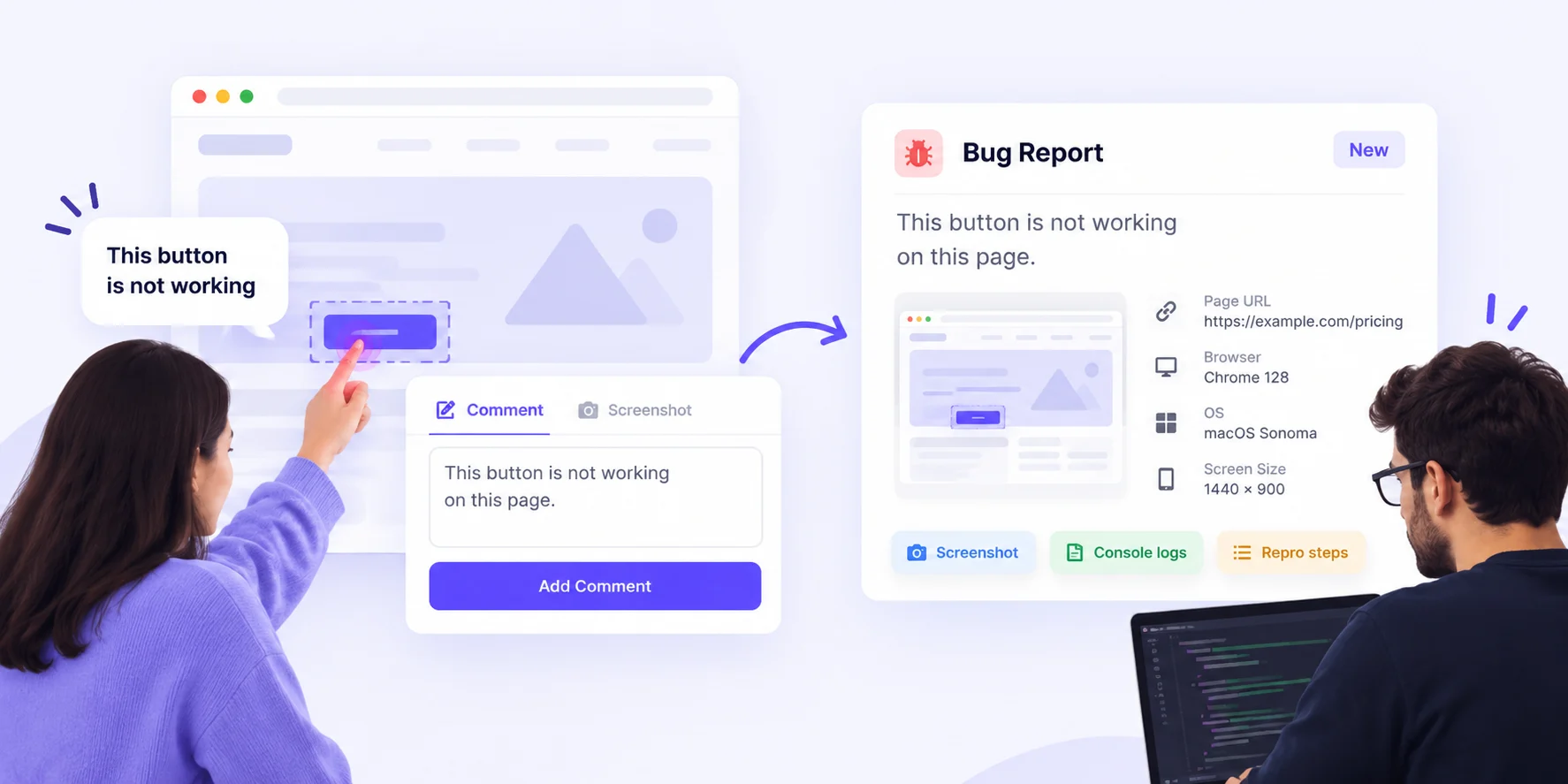
To get bug reports from clients that developers can actually fix, stop asking clients to write better reports. Give them one link where they click on the broken thing and type what went wrong. Let the tool capture the page, a screenshot, the browser, OS and screen size for them.
That’s the whole idea. The rest of this guide shows how to set it up.
If you run an agency or freelance, you know the pain. A client emails “the site is broken” at 11 pm. Your developer reads it the next morning and has five questions. Which page? Which device? What did you click? The fix takes ten minutes. Getting the details takes two days.
TL;DR
- Clients describe how a bug feels. Developers need where it is and how to repeat it.
- Don’t train clients. Design a reporting channel that captures the details by default.
- Use one link, pinned comments and auto-captured browser data.
- Judge each report with one test: could a developer fix it without asking a single follow-up question?
Why Bug Reports From Clients Rarely Help Developers
Clients aren’t lazy. They just aren’t testers. They see a problem, feel annoyed, and send the quickest message they can. That message almost always misses the four things a developer needs:
- Location: the exact page and the exact element.
- Steps: what they did right before it broke.
- Expected vs. actual: what should have happened, and what did.
- Environment: browser, operating system and screen size.
Each missing piece costs one round of back-and-forth. Across a busy project, those rounds turn into days of delay and hours you can’t bill.
Vague vs. Fixable: What Developers Actually Need
Here’s how common client messages compare with what a developer needs to start work.
| What the client sends | What the developer needs |
|---|---|
| “The button doesn’t work.” | Which button, on which page, and what happened on click |
| “It looks weird on my phone.” | Device, OS, screen size and a screenshot |
| “The form is broken.” | The steps taken and the error shown |
| “Fix the thing from yesterday.” | One issue per report, pinned to the spot |
| “Still not working.” | Which version they checked, and when |
Notice the pattern. Almost everything in the right column can be captured by a tool. Only the steps and the expected result need the client’s words.
How to Get Bug Reports From Clients: 6 Steps
1. Pick one channel and say it on day one
If bugs can arrive by email, WhatsApp, Slack and phone, some will get lost. Name a single place for reports in your kickoff call and in your client onboarding checklist. Then politely redirect anything that arrives elsewhere.
2. Send a review link, not a form
Forms ask clients to describe a page in words. A review link lets them click on the page itself. With BugSmash, clients open the live site in their browser, click the problem and type a comment. No account, no install. We covered this in detail in how to collect client feedback on a live website without screenshots.
3. Let the tool collect the technical details
Never ask a client, “Which browser are you on?” Many won’t know. The BugSmash feedback widget attaches a screenshot plus browser, OS and screen-size details to every submission automatically.
4. Ask only three questions
Clients will answer three short questions. They won’t fill in a twelve-field template. On paid plans, you can put them in a welcome note on the project:
- What were you trying to do?
- What did you expect to happen?
- What happened instead?
5. One pin, one problem
Ask clients to leave a separate comment for each issue. “The menu overlaps the logo and the form won’t send” is two bugs. Split them, and each one can be assigned, fixed and closed on its own.
6. Route reports to developers and close the loop
On paid plans, send each comment straight into the tool your developers already use, such as Jira, Linear or ClickUp. If your team uses AI coding agents, the BugSmash MCP server lets an agent read open comments and work on the fixes. When a fix ships, share the new version and ask the client to approve it right on the page (approvals are on paid plans too).
The Zero Follow-Up Test: Fix the Channel, Not the Client
Most agencies try to solve bad reports with a “How to report a bug” PDF. Clients don’t read it. That’s not their fault. Writing good bug reports is a developer skill, and you hired yourself out so they wouldn’t need one.
Here’s a better way to think about it. A bad report costs your developer time, not the client’s. So the job of fixing it belongs to you.
Try this simple measure for a month. For every client report, count the follow-up questions your developer had to ask before starting work.
- Zero questions: your channel works.
- One question: something is missing from your setup, usually the steps or the device.
- Two or more: the client is still reporting by email or chat.
When most reports pass at zero, you’ve solved the problem for good, without asking clients to change at all.
Where BugSmash Fits
BugSmash is built around the steps above. Clients comment as guests through one link, and guests are unlimited. On paid plans, comments can flow into Jira, Linear, ClickUp, Slack and other integrations. The same workflow covers live websites and mobile apps. See how development and QA teams use it.
The free plan includes unlimited guest reviewers, the feedback widget and MCP. Integrations, welcome notes and approvals start on the Starter plan. See pricing for team plans.
Other tools, such as BugHerd and Marker.io, also capture on-page bug reports. If you’re weighing options, our comparison of visual website feedback tools for agencies lays them out side by side.
FAQ
What should a bug report from a client include?
The page, the element, what they did, what they expected, what happened, and their browser, OS and screen size. A good tool captures most of this automatically.
Do clients need an account to report bugs in BugSmash?
No. Clients open your review link and comment as guests, with no signup or download.
How do I stop clients sending bugs over WhatsApp and email?
Agree on one channel at kickoff. When a bug arrives elsewhere, reply kindly with the review link and ask them to pin it there.
Can client bug reports go straight into Jira?
Yes, on Starter and above. BugSmash can send comments to Jira, Linear, ClickUp, Asana and other tools, so developers work from their usual board.
What’s the difference between a bug and a change request?
A bug is something that doesn’t work as agreed. A change request asks for something new. Tag them differently so scope stays clear.
Conclusion
You can’t turn clients into testers, and you don’t need to. Give them one link, let them point at the problem, and let the tool collect the technical details. Then check every report with the zero follow-up test. When your developers stop asking questions, they start fixing bugs.



Leave a Reply