Your AI Agents can now act on comments added in BugSmash with our MCP. See How it works.

Part of the BugSmash review workspace

Share feedback on any website or web app with the BugSmash browser extension

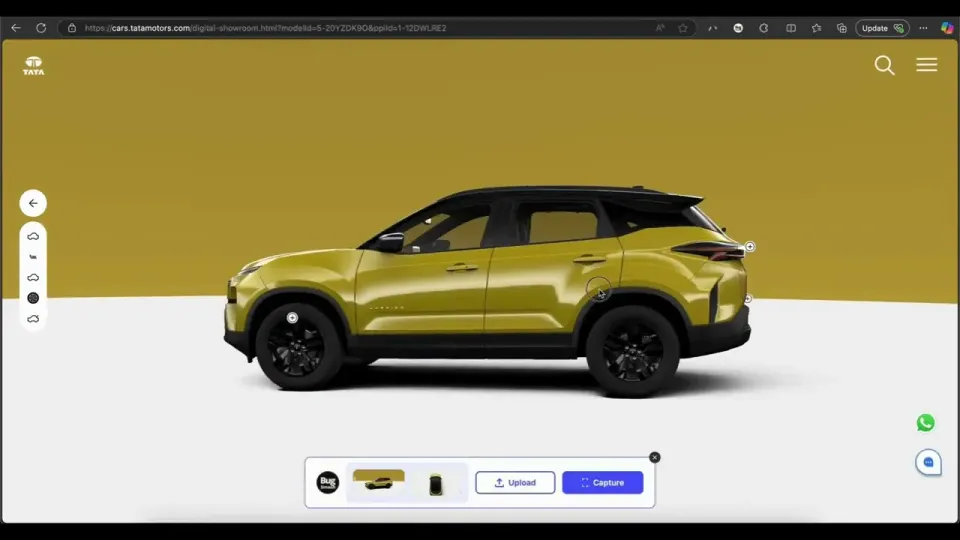
Screenshot it, mark it up, or record the whole flow, then send one link your team can act on. It works on the pages a review link cannot open, from dashboards behind SSO to internal tools and localhost builds.

See how it fits into BugSmash

Whoever fixes it just opens the link. Works in Chrome, Edge, Brave and Firefox.

Choose your feedback workflow

Browser extension, review link or feedback widget: which one fits?

All three send feedback to the same BugSmash workspace. What changes is who is giving the feedback and where the page lives.

You are here

Browser extension

Share your own feedback with your team

Best for
Web apps, dashboards, internal tools, pages behind SSO, localhost and staging builds.
Who uses it
Product managers, QA, founders and managers reviewing what their team or agency built.
Setup
You install it once. Whoever receives the link installs nothing.

Website review link

Collect feedback from clients and stakeholders

Best for
Websites, landing pages, campaign pages, CMS builds and accessible staging sites.
Who uses it
Agencies, freelancers and marketing teams getting sign-off from clients.
Setup
Paste a URL and send the review link. Clients need no extension.

Feedback widget

Collect feedback from inside your site or app

Best for
Signed-in web apps, internal tools, multi-step flows, UAT and ongoing reports after launch.
Who uses it
Product and development teams running UAT, beta tests and post-launch support.
Setup
Add one snippet so people can report from the page itself with context attached.

How it works

How the BugSmash browser extension works

From what you see to what gets fixed.

11

Spot it

Open any page in your browser, signed in or not, and review it in the state your team needs to see.

22

Capture it

Take annotated screenshots, record the flow, and keep several captures together in the same review.

33

Send it

Share one BugSmash link so your team can see every item in context and move the work into its existing workflow.

What you can capture

Annotate screenshots and record your screen on any web page

Show the problem instead of describing it.

Annotated screenshots

Point to the exact button, line, chart or interface detail that needs attention.

Screen recordings

Record a complete browser flow when the issue takes several steps to reproduce.

Anything behind a login

Capture admin panels, dashboards and web apps from your own authenticated browser session.

Local and staging builds

Share feedback on work before it has a public URL, including localhost and staging environments.

Made for

Who uses the BugSmash browser extension

Anyone reviewing work that someone else will fix.

Product and QA teamsFounders and managersAgency leadsMarketing teams
Product and QA teams using BugSmash

Product and QA teams

Review releases in staging and report issues with the visual context developers need to reproduce them.

Staging releasesBug reportsAdmin panels
Founders and managers using BugSmash

Founders and managers

Walk through what your team or agency built and send clear feedback without booking another call.

DashboardsInternal toolsVendor builds
Agency leads using BugSmash

Agency leads

Brief your own developers and designers on fixes while the page and its current state are in front of you.

Site QAClient portalsPre-launch checks
Marketing teams using BugSmash

Marketing teams

Flag issues on live pages and campaign previews for your internal web team or agency.

Landing pagesCMS previewsLive site fixes

After you send it

Feedback that turns into finished work

The extension makes capture fast. The BugSmash workspace keeps the review useful through handoff and resolution.

One link for everyone

Teammates open one review link and see every capture with its page and visual context intact.

Into your task tracker

Move feedback into Jira, Linear, ClickUp, Asana or Slack through BugSmash integrations.

Ready for AI workflows

Use the BugSmash MCP server to bring supported review context into Claude, Cursor or another compatible client.

Tracked through resolution

Keep each item organized in the BugSmash workspace as your team works through the review.

Browser support

Works in Chrome, Edge, Brave and Firefox

Install it from your browser's store and sign in to your BugSmash workspace.

FAQ

BugSmash browser extension FAQ

Everything you need to know before sharing browser feedback with your team.

What is the BugSmash browser extension?

A way to share visual feedback on any page you can open in your browser. Capture annotated screenshots and screen recordings, and BugSmash puts them together in one review link for your team.

Capture the issue while it is still on screen

Install the extension to share feedback with your team. Use BugSmash to collect it from everyone else.

Get started free